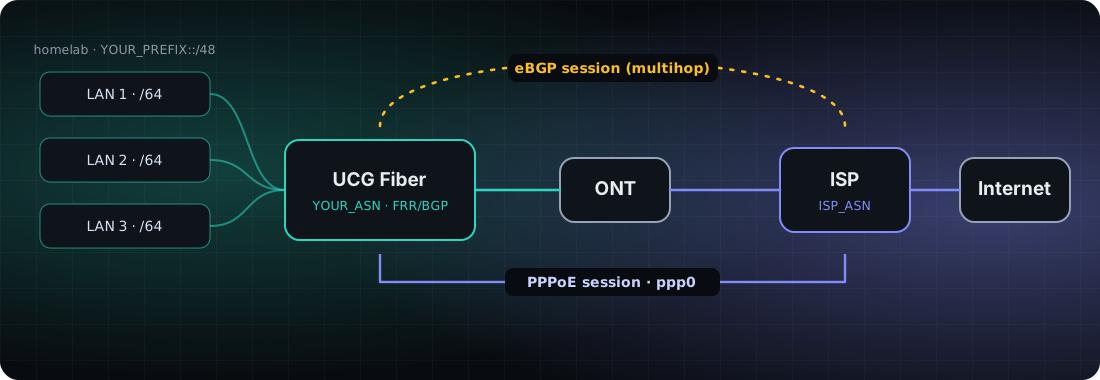
In my last post I covered how I became my own ISP: an ASN, a /48 and a sponsoring LIR. This one is the practical follow-up. I announce that /48 with BGP from a UniFi Cloud Gateway Fiber (UCG Fiber) on a PPPoE WAN. It works, but UniFi got in the way in two places: it keeps requesting a DHCPv6 prefix that you can't turn off, and "Static" IPv6 on a PPPoE WAN adds a default route on the wrong interface. This post covers the setup, those two problems, and the workarounds I'm using.
Everything below comes from my own setup, so treat it as a starting point and check it against your firmware and your ISP.
Quick answers: common UniFi BGP problems
Short answers for anyone who landed here with a specific problem. The detail is further down.
- Can a UniFi Cloud Gateway Fiber (UCG Fiber) run BGP? Yes. Upload an FRR config under Settings > Routing > BGP. If your ISP's neighbour address is reached across the PPPoE link, use multihop eBGP with your PPPoE address as the source. See the FRR config.
- BGP session stuck in Active over PPPoE? Capture packets on
ppp0. In my case my ISP opened the connection to TCP 179 on my side, and UniFi was dropping it, so I needed a WAN-to-gateway allow rule limited to the neighbour. See the firewall rule and the debugging commands. - BGP is up but my prefix isn't announced? FRR only announces a prefix that exists in the routing table, so add a static blackhole route for the whole /48. See the route.
- UniFi keeps requesting a DHCPv6 prefix on a PPPoE WAN?
odhcp6c -P 0 ppp0keeps running even with prefix delegation off on every LAN. Setting the WAN IPv6 to Static stops it. See Problem 1. - IPv6 and BGP die after switching the PPPoE WAN to Static IPv6? UniFi adds
default via fe80::… dev eth4 table 201.ppp0, which beats the workingdefault dev ppp0. Delete it withip -6 route del, and expect it back after a reboot. See Problem 2 and the workaround. show bgpsays "command not found"? Run FRR commands throughvtysh -c "...". See the toolbox.
What I was trying to do
I wanted to use my own IPv6 space under my own ASN instead of whatever prefix my ISP hands out. My ISP is also my sponsoring LIR, so the starting point was:
- an ASN registered with RIPE through my sponsoring LIR
- a /48 from the same ISP
- a UCG Fiber on a PPPoE connection
- BGP to my ISP so the /48 is announced under my own ASN
I use placeholders throughout: YOUR_ASN, YOUR_PREFIX::/48, ISP_NEIGHBOR (the neighbour address your ISP gives you) and YOUR_PPPOE_IPV6 (your address on the PPPoE link). Swap in your own.
Step 1: the RIPE side (aut-num, route6 and RPKI ROA)
Before any router config, a few objects need to exist. With a sponsoring LIR most of this is their job, so ask them.
- Your ASN and
aut-numobject. Check the status isASSIGNED, thesponsoring-orgis right, and your import/export lines are what you expect. - A
route6object for the /48 withorigin: YOUR_ASN. The prefix holder (your ISP) has to authorise it. - An RPKI ROA for the /48 with your ASN as origin and a max length of /48. Without it, some networks treat your announcement as unverified, and a ROA with the wrong origin makes it invalid.
You don't need your own RPKI certificate. The ROA is created by whoever holds the address space.
Step 2: the FRR BGP config on the UCG Fiber
Recent UniFi Network versions let you upload an FRR config. Look under Settings > Routing > BGP, though the menu name may differ on your version. My ISP gave me a neighbour address that isn't on a shared subnet, because it's reached across the PPPoE link. That means multihop eBGP, with the source address set to my PPPoE address.
router bgp YOUR_ASN
 bgp router-id YOUR_IPV4_ADDRESS
 no bgp ebgp-requires-policy
 no bgp default ipv4-unicast
 neighbor ISP_NEIGHBOR remote-as ISP_ASN
 neighbor ISP_NEIGHBOR description ISP
 neighbor ISP_NEIGHBOR ebgp-multihop 10
 neighbor ISP_NEIGHBOR update-source YOUR_PPPOE_IPV6
 !
 address-family ipv6 unicast
  network YOUR_PREFIX::/48
  neighbor ISP_NEIGHBOR activate
  neighbor ISP_NEIGHBOR prefix-list ANNOUNCE out
  neighbor ISP_NEIGHBOR prefix-list DENY-ALL in
 exit-address-family
!
ipv6 prefix-list ANNOUNCE seq 5 permit YOUR_PREFIX::/48
ipv6 prefix-list DENY-ALL seq 5 deny ::/0 le 128
What the interesting lines do:
bgp router-idis in IPv4 format even on an IPv6-only setup. It's just a label, but FRR wants one. I used my static IPv4.ebgp-multihopandupdate-sourceare needed because the neighbour isn't directly connected.update-source ppp0also worked for me.DENY-ALLinbound means I only announce my /48 and accept nothing back. That stops the ISP's routes from competing with my PPPoE default route.ipv6 prefix-listis the form FRR needs for IPv6. Copying a template that saysip prefix-listwon't work.
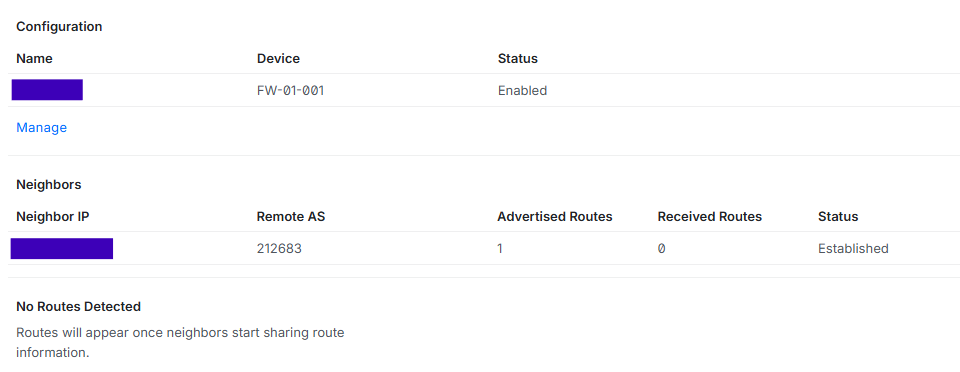
Once it's up, the routing page shows the neighbour as Established, with one advertised route and none received. That's the DENY-ALL inbound filter doing its job.
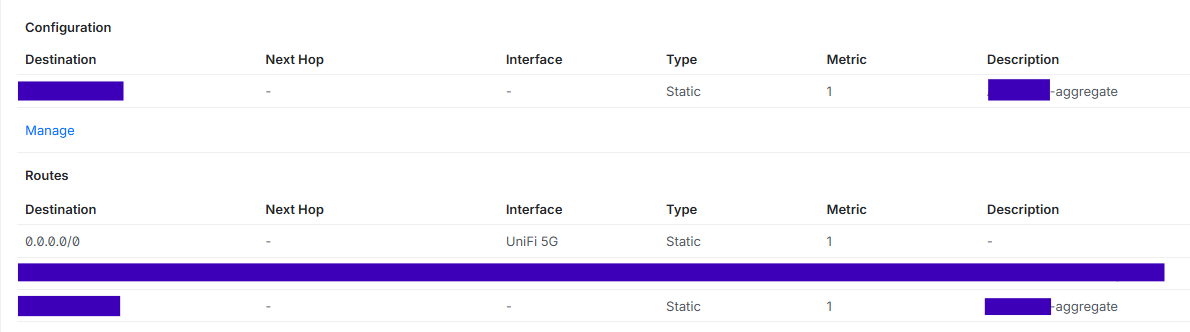
The /48 needs a route, or nothing is announced
FRR's network statement only announces a prefix that's in the routing table. Your LANs are /64s, so you need a static blackhole route for the whole /48. FRR didn't install the one in my uploaded file, so I added it as a static route in the UniFi UI instead.
The firewall: my ISP opened the connection (allow TCP 179)
I assumed my router initiated the BGP session. A packet capture showed the opposite: my ISP's router connected to port 179 on my side. UniFi drops unsolicited inbound traffic by default, so I needed an allow rule: External to Gateway, TCP, destination port 179, source set to the neighbour address only. Never open 179 to the world.
One mistake worth mentioning: I first set 179 as the source port. BGP connects to port 179 from a random port, so the rule never matched. You can check whether a rule is being hit from the packet counters (ip6tables -L UBIOS_WAN_LOCAL_USER -v -n).
Step 3: put the /48 on your LAN with SLAAC
Give each LAN its own /64 from the /48 under Settings > Networks > the network > IPv6. Set the interface type to Static, the gateway to YOUR_PREFIX:0:1::1/64, and turn Router Advertisement on. Clients then autoconfigure with SLAAC.
To check a client has picked up an address from your /48, use ipconfig on Windows or ifconfig en0 | grep inet6 on a Mac. A Mac has ping6, not ping -6.
Problem 1: you can't turn off DHCPv6 prefix delegation on a PPPoE WAN (odhcp6c)
My ISP asked me to make sure prefix delegation was off on my account. UniFi's WAN IPv6 settings only offer DHCPv6 (with a delegation size of Auto or a fixed size, smallest /48) or Static. Even with prefix delegation turned off on every LAN, the gateway runs odhcp6c -P 0 ppp0, which keeps requesting a prefix. You can see it with:
ps aux | grep odhcp6c
In my case the BGP session sat in Active with no reply while the prefix request was running, and came up within seconds when I set the WAN IPv6 to Static, so no prefix was requested. I saw that twice. I can't prove the prefix request was the cause, but it's the pattern I saw.
Problem 2: Static IPv6 on a PPPoE WAN adds a bad default route via eth4
This one cost me hours. With the WAN on Static, UniFi adds this:
default via fe80::<peer link-local> dev eth4 table 201.ppp0 proto static metric 1
It's bound to the physical port (eth4), but the peer is only reachable over ppp0. It beats the working default dev ppp0 on metric, so IPv6 dies and BGP drops. It comes back after every reboot, reprovision or config upload.
To check for it:
ip -6 route show table all | grep -E "^default"
To remove it:
ip -6 route del default via fe80::200:ff:fe00:0 dev eth4 table 201.ppp0
Entering the gateway as fe80::...%ppp0, or leaving it blank, gets rejected in the UI. In DHCPv6 mode the default route is fine (dev ppp0, learned from a router advertisement), so the problem only appears with Static.
The workaround
A background loop that deletes the route every few seconds:
nohup sh -c 'while true; do ip -6 route del default via fe80::200:ff:fe00:0 dev eth4 table 201.ppp0 2>/dev/null; sleep 10; done' >/dev/null 2>&1 &
It dies at reboot, so I also wrote a small script for a Raspberry Pi that SSHes into the UCG every minute, removes the route if it's there, restarts the loop if it isn't running, and logs the BGP state. It's a hack, and I'd love a proper fix.
A few smaller things
vtyshis how you get FRR'sshowcommands. Typingshow bgp ...in the normal shell gives "command not found".- A reset can take a while to recover. After stopping a session, mine only came back after a few minutes, and once only after a full PPPoE reset.
- UniFi may ignore lines in an uploaded FRR file, like the blackhole route. Check
vtysh -c "show running-config"to see what actually loaded.
Debugging toolbox: vtysh and tcpdump commands
On the UCG, SSH in and use vtysh for FRR:
vtysh -c "show bgp ipv6 unicast summary"          # session state and prefixes sent
vtysh -c "show bgp ipv6 unicast YOUR_PREFIX::/48" # what you announce
vtysh -c "show running-config"                    # what actually loaded
vtysh -c "clear bgp ipv6 unicast ISP_NEIGHBOR"    # restart the session
ip -6 route show table all | grep -E "^default"   # look for the bad route
ip -6 addr show ppp0                              # your PPPoE address
tcpdump -n -i ppp0 'ip6 and host ISP_NEIGHBOR and tcp port 179'
Once the session is Established, check the outside view too. Search your prefix on bgp.tools and confirm it's visible, with the right origin AS and a valid RPKI status.
When a session is stuck in Active, the packet capture is what finds the cause. SYNs leaving and nothing coming back means the other side isn't answering. No SYNs at all means your own router isn't trying.
What I'd do differently
- Ask the ISP up front whether they initiate the BGP session or expect you to, and what source address they have configured for you.
- Capture packets early instead of guessing at config.
- Check the route table after every UniFi change, not just the BGP config.
Still unsolved
- I haven't found a way to stop UniFi requesting a DHCPv6 prefix on a PPPoE WAN.
- I haven't found a clean way to stop Static IPv6 binding the default route to the physical WAN port.
If you've solved either on a UCG Fiber, I'd love to hear how.
This is what worked on my setup, with my ISP. Firmware versions, menus and ISP behaviour differ, so check things against your own situation. Don't paste your PPPoE credentials, or anything containing them, anywhere public.